
AI-Powered Chrome Translation Tool
Overview
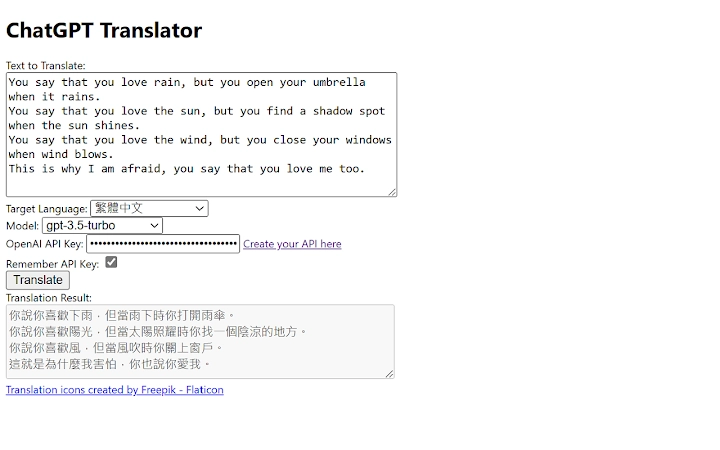
ChatGPT Translator is a Google Chrome extension designed to streamline text translation through artificial intelligence. Built on advanced natural language processing technology, it enables users to translate selected text across multiple languages with minimal effort. The tool leverages OpenAI’s GPT-3.5 Turbo model to deliver accurate and context-aware translations, offering a modern alternative to traditional translation services. Its core purpose is to enhance multilingual communication by reducing manual steps and improving translation quality.
Target users include professionals, students, and content creators who frequently work with foreign language content. The extension is particularly useful for individuals who need to quickly interpret web pages, documents, or messages in real time. By integrating directly into the Chrome browser, it supports seamless workflows without requiring external applications. The developer did not provide additional information about the development background or organization behind the tool.
Real-world usage scenarios include translating news articles, social media posts, academic papers, or customer messages. The ability to automatically detect source languages eliminates the need for manual selection, making the tool efficient for users handling diverse linguistic input. It is especially beneficial in environments where speed and accuracy are critical.
Key Features & Capabilities
- AI-Powered Translation: Utilizes OpenAI’s GPT-3.5 Turbo model for high-quality, context-sensitive translations that go beyond literal word-for-word conversion.
- Multi-Language Support: Translates between a wide range of languages, enabling global communication across different linguistic regions.
- Automatic Language Detection: Identifies the source language of selected text without user input, simplifying the translation process.
- Browser Integration: Functions directly within Google Chrome, allowing instant access via right-click context menu or keyboard shortcuts.
- API Key Authentication: Requires users to provide their own OpenAI API Key, ensuring secure access and personalized usage control.
These features allow users to translate content from websites, emails, or documents with minimal disruption. For example, a researcher reading a foreign-language article can highlight the text and instantly receive a translated version. Similarly, a marketer analyzing international customer feedback can quickly assess sentiment and content without language barriers. The integration of AI ensures that translations maintain grammatical accuracy and natural phrasing.
User Interface, Workflow & Performance
The user interface of ChatGPT Translator is minimal and designed for efficiency. It operates as a browser extension, with no standalone window or complex settings. The primary interaction occurs through the right-click context menu, where users can select “Translate” after highlighting text. The translation result appears in a small pop-up overlay, allowing quick review without leaving the current page.
Navigating the tool is intuitive, with no learning curve for basic use. Workflow efficiency is enhanced by automatic language detection and direct access from the context menu. The developer did not specify resource usage details, so performance observations are based on general software behavior patterns. Users can expect stable operation under typical browsing conditions, though actual CPU and RAM behavior may vary depending on system configuration and API response times.
Stability appears consistent with standard Chrome extensions, and no known issues were reported in the release notes. The extension does not require background processes beyond the active session, minimizing impact on system performance. However, translation speed depends on the user’s API key response time and internet connectivity.
Compatibility & System Requirements
ChatGPT Translator is compatible with Windows, Mac, and Linux operating systems, making it accessible to a broad user base. It is designed specifically for Google Chrome, ensuring full functionality across all supported platforms. The installation size is 1.2 MB, indicating a lightweight footprint that does not consume significant disk space.
Exact system requirements were not listed. Compatibility information is limited to the supported operating systems and browser. The developer did not provide additional details about hardware specifications, minimum RAM, or CPU requirements. Users should ensure their system runs a current version of Google Chrome to maintain compatibility and security.
Pros and Cons
Pros
- High-quality translations powered by GPT-3.5 Turbo
- Automatic language detection for faster workflow
- Lightweight and easy to install (1.2 MB)
- Direct integration with Google Chrome
- Supports multiple languages without manual selection
Cons
- Requires a personal OpenAI API Key for access
- No built-in translation history or offline mode
- Performance depends on third-party API availability
- Not available for other browsers beyond Chrome
- Limited user support or documentation provided
FAQ Section
Is ChatGPT Translator available for browsers other than Chrome?
The extension is currently designed exclusively for Google Chrome. There is no official support for other browsers such as Firefox or Edge.
Do I need to pay to use ChatGPT Translator?
Yes, the software is free to download and install. However, users must provide their own OpenAI API Key, which may incur costs based on usage.
How do I get an API Key for OpenAI?
Users can obtain an API Key by signing up at the OpenAI website. The key is used to authenticate requests and access the GPT-3.5 Turbo model.
Can I use this tool offline?
No, the extension requires an active internet connection to communicate with OpenAI’s servers. It does not support offline translation or cached results.
Is my data secure when using the extension?
The extension sends text to OpenAI’s servers for translation. Users should review OpenAI’s privacy policy to understand data handling practices. The tool does not store user data locally.
Final Thoughts + CTA
ChatGPT Translator delivers a powerful, AI-driven translation experience directly within the Chrome browser. Its ability to automatically detect languages and leverage the GPT-3.5 Turbo model makes it a valuable tool for anyone working with multilingual content. While it requires an API key and relies on external services, its seamless integration and accuracy justify its use for professionals and frequent international communicators.
Despite minor limitations such as browser exclusivity and the need for an active API connection, the extension remains a reliable and efficient solution. Its lightweight design and straightforward interface ensure smooth adoption. For users seeking a fast, accurate, and intelligent translation tool, ChatGPT Translator stands out as a top choice.
Download ChatGPT Translator now







